VunFisherby TX Cyber

From scan readiness to proof of closure.

VunFisher helps Windows-focused teams assess the systems they are authorized to assess, decide what matters, and prove it was fixed.
  • Free during early access
  • Read-only checks
  • Runs on your own Windows computer
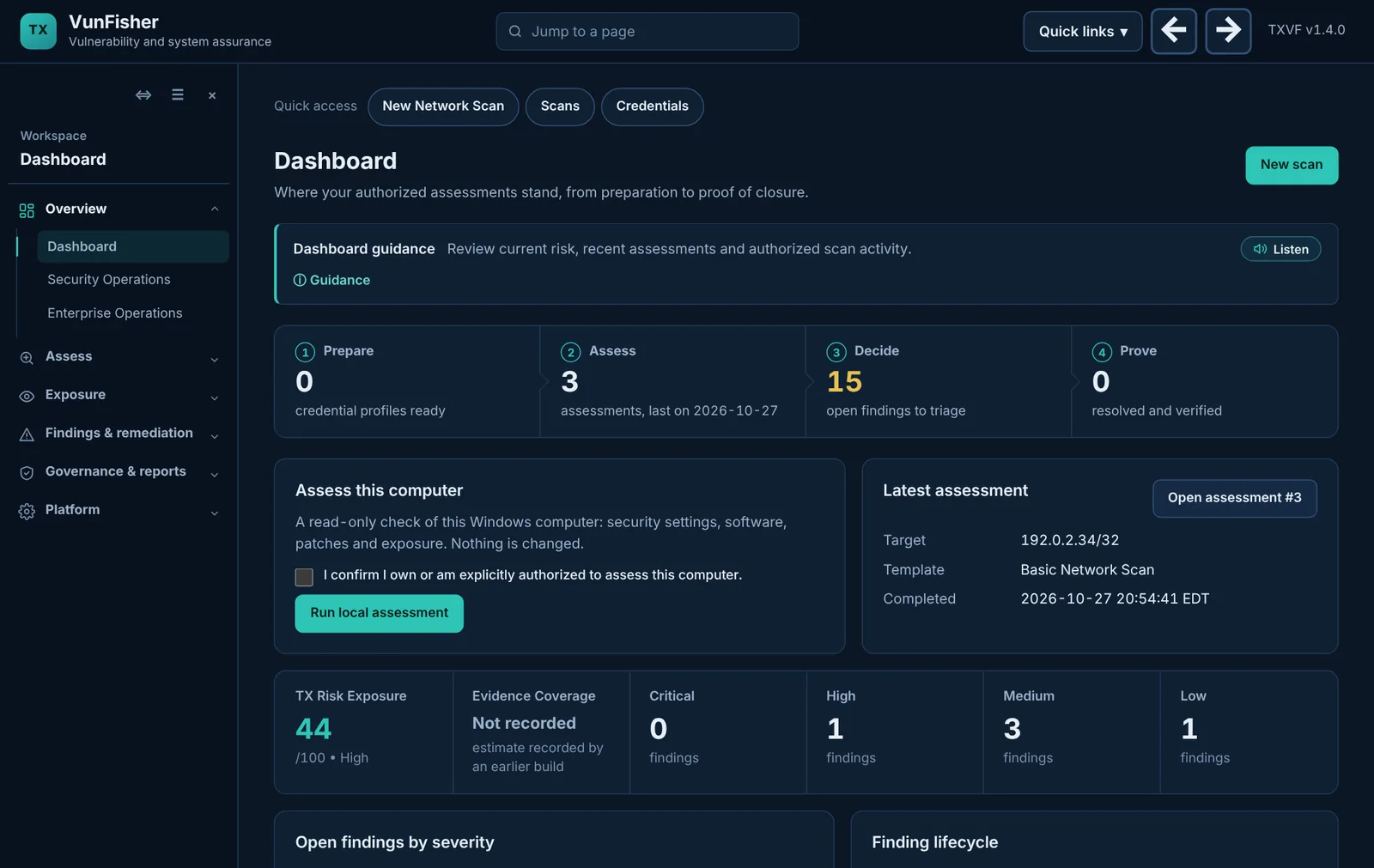
The VunFisher dashboard: the assurance workflow from Prepare to Prove with live counts, a local assessment card and the latest assessment.
The VunFisher dashboard, shown with demonstration data.

Build 2026102674 is available for authorized Windows testing.

VunFisher 1.4.0 beta, with a published SHA-256, signed update metadata and a software bill of materials.

What is in this release

One loop, from preparation to proof.

Every assessment in VunFisher moves through the same four steps, and the evidence stays attached from the first scan to the closing retest.

  1. Prepare

    Check that each target is reachable and authorized, save credential profiles, and test them before you scan.

    Credentials and preflight
  2. Assess

    Run read-only assessments of this computer, your private network, directories, cloud accounts, clusters or software inventories.

    Scans and templates
  3. Decide

    Review evidence, severity and known exploitation. Assign owners and due dates, or record an accepted risk with a reason.

    Findings and remediation
  4. Prove

    Re-assess after the fix. VunFisher compares the evidence and records what persisted, resolved or came back.

    Retest and reports

What you can assess today.

Every template below is read-only and available in this beta. Each one refuses to run if its credentials could change anything or read stored data. Readiness differs by template; the roadmap shows each one’s status.

This Windows computer

  • Security and health assessment
  • Malware indicators
  • Credentialed patch audit

Your private network

  • Host and service discovery
  • Network and TLS assessments
  • Credentialed Windows and Linux
  • AI and ML service discovery

Directories and devices

  • Active Directory over LDAPS
  • Microsoft Intune devices
  • Credential validation

Cloud and containers

  • AWS configuration
  • Azure configuration
  • Google Cloud configuration
  • Kubernetes clusters

Software you build or run

  • SBOM components against OSV data
  • Website baseline checks
  • Database exposure checks

Standards and evidence

  • Offline configuration audit
  • NIST SP 800-53 policy mapping
  • SCAP results from OpenSCAP or SCC

Coverage depends on the evidence each assessment can collect. See the capabilities and roadmap for what is planned.

Start with a template, not a blank form.

Choose what you want to assess and VunFisher shows only the settings that template needs. Planned templates are listed separately and cannot be run.
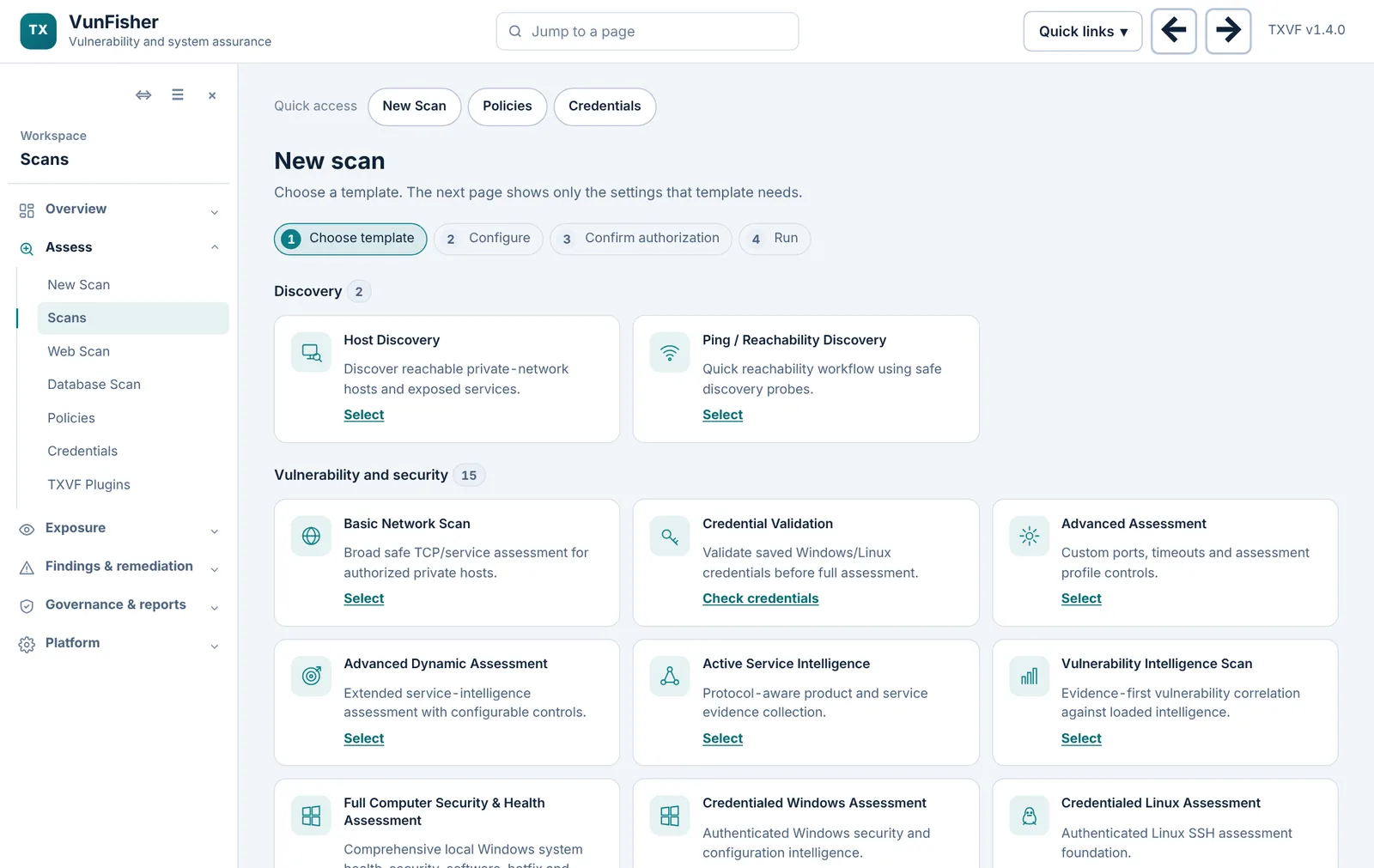
  • One step at a time: template, configure, confirm authorization, run
  • Private-scope and authorization checks before any scan starts
  • Saved policies to repeat the same assessment later
The New scan page with templates grouped by discovery and vulnerability assessments.
Choosing a template, in the light theme.

Every finding keeps its evidence.

Reports show where each finding came from: the source assessment, how it was matched, and how confident the match is. Coverage gaps are shown, never hidden as a clean result.
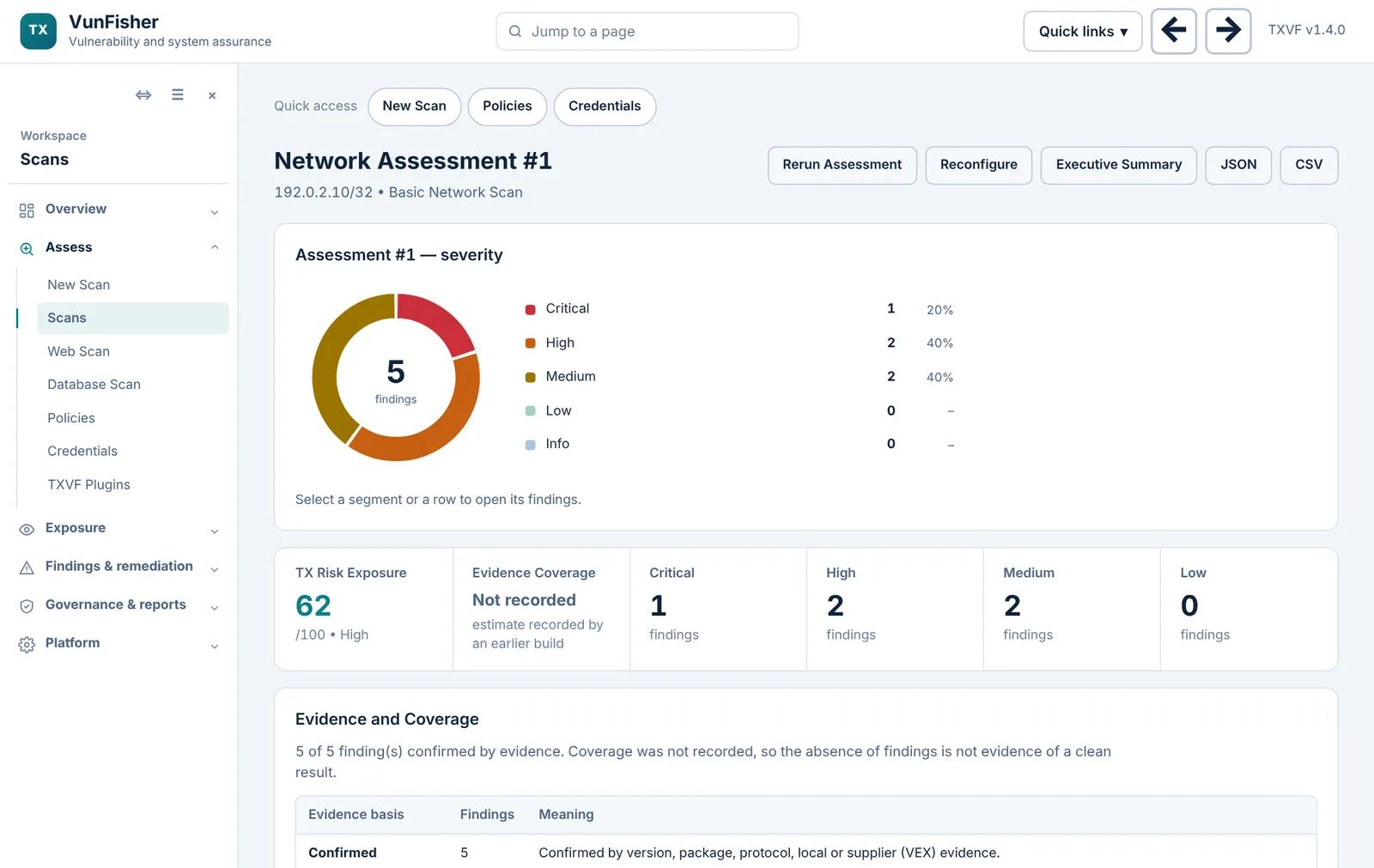
  • Severity ring linked to the findings behind it
  • Evidence basis: confirmed, needs confirmation or configuration review
  • Executive summary, JSON and CSV exports
A network assessment report with severity breakdown, risk score and evidence summary.
An assessment report, shown with demonstration data.

Built to be safe to run.

VunFisher is an assessment tool, not an attack tool. These rules apply to every template.

Read-only by design

No exploitation, password guessing, configuration changes or disabling of protection. Cloud and cluster audits refuse credentials that could write or read stored data.

Authorization before every scan

Each run records who confirmed authorization and for which scope. Network scans are limited to private address ranges.

Evidence is labelled honestly

Findings say whether they are confirmed, declared in a supplied file, or a hypothesis that needs confirmation. Missing coverage is reported as a gap.

Your data stays with you

Assessments run on your Windows computer. Secrets are held in the Windows-protected vault and never appear in logs, reports or exports.

How it is deployed.

Install the Windows app on a computer inside your authorized network. Optionally, connect Windows computers to a hosted workspace that reviews their uploaded results.

Your authorized network VunFisher Windows appRuns assessments, stores evidencelocally, protects secrets with Windows Computers and servers Directory, Intune, cloud Windows agents read-only checks Hosted workspace (optional)Reviews uploaded summaries in a browseron desktop, tablet or phone completed summaries no commands sent back

Reports leaders can act on.

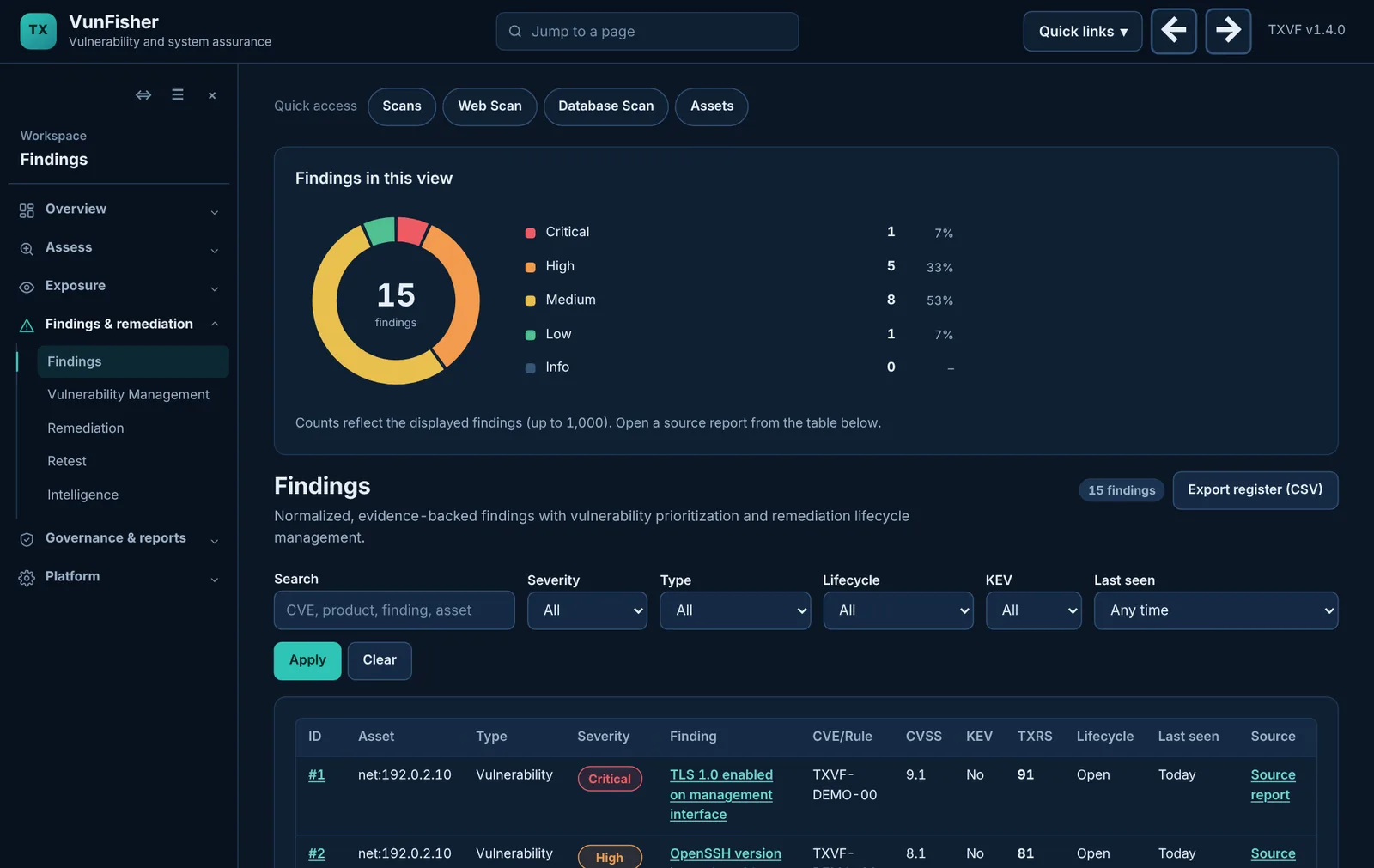
Turn evidence into decisions without re-typing it: executive summaries, risk and POA&M records, compliance mappings and an authorization evidence package, all drawn from the same assessments.
  • Executive summary for each assessment
  • Risk acceptance with reasons and expiry
  • RMF and NIST SP 800-53 evidence views
The findings list with severity, risk score and lifecycle filters.
Findings across all assessments, shown with demonstration data.

Build 2026102674 is available for authorized Windows testing.

This is a controlled beta: the capabilities marked Ready for controlled testing are implemented and ready for tester evaluation, and they still need field feedback.

Current release

VunFisher 1.4.0 beta

Published with a complete SHA-256, signed update metadata and a software bill of materials.

Ready for controlled testing

The Windows assessment workflow

Installation, local account and MFA, licensing, local assessment, WinRM preflight, evidence review, remediation, retest and report export.

Field acceptance required

Three environments, three receipts

Workgroup, Active Directory and Intune-managed targets are recorded separately. One passing environment does not establish the others.

Current limits

Not a certification

Publisher code signing, enterprise-scale proof, external plugin bundles and completed Apply and Undo field acceptance remain outstanding.

Recently added

  • Sharper product recognition. Scans now name the product and version behind more services (FTP and mail servers, Squid, Jetty, Tomcat, CouchDB, and the versions Kibana, Solr, Consul, Nomad and InfluxDB report), so end-of-life and vulnerability matching can use them.
  • Open file shares and message brokers. Network scans now report NFS shares exported to every host, and Kafka brokers and ZooKeeper ensembles that accept anonymous clients, using short read-only exchanges and keeping only counts.
  • Open cluster services. Network scans now report HashiCorp Consul and Nomad, InfluxDB and Apache Cassandra when they answer without a sign-in, using one read-only request and keeping only a count or version.
  • Open databases and admin consoles. Network scans now report MongoDB, Hadoop YARN, Apache Solr and Kibana when they answer without a sign-in, using one read-only request and keeping only a count or version.
  • Services that let anyone in. Network scans now report an MQTT broker, X11 display, rsync daemon or Kubernetes API server that accepts anonymous clients, using one handshake and keeping only counts.
  • Open data stores and cluster APIs. Network scans now report a CouchDB, Docker Registry, etcd or Kubernetes kubelet that answers without credentials, keeping only counts and versions.
  • Exposed web files. Network scans now report a .git folder, a .env settings file, a server status page or a phpinfo() page that anyone can download, without keeping the files.
  • Management interfaces reachable. Network scans now report server controllers (iDRAC, iLO), hypervisor consoles (ESXi, Proxmox), admin consoles (Webmin, Cockpit, phpMyAdmin, Portainer), an open Jenkins dashboard and WinRM over HTTP.
  • Ask VunFisher explains how a finding was found. Paste a finding or its evidence line and the assistant says what VunFisher read, from where, and what each part means.
  • Network Exposure summary. Every network scan result and executive report now groups exposure findings into plain categories, lists the hosts and says what to fix first.
  • Network exposure checks. SMB signing not required, Remote Desktop without Network Level Authentication, Telnet and FTP, VNC, Redis, Elasticsearch, Docker and Memcached open without a password, weak, short-key or self-signed certificates, SMB version 1, HTTP TRACE, 3DES or RC4 TLS ciphers, weak SSH algorithms, mail servers without STARTTLS, databases without encryption, and directory listings. Handshakes only: nothing signs in.
  • OVAL evaluation on Windows. Evaluate Windows OVAL definitions you supply on the computer running VunFisher. Read-only; unsupported test types are listed as not evaluated.
  • SBOM component assessment. Match a product's CycloneDX or SPDX components against OSV advisory data you import. Offline.
  • Kubernetes audit. Privileged containers, host access, cluster-admin grants, NetworkPolicy and Pod Security gaps.
  • Cloud audits. Read-only AWS, Azure and Google Cloud checks of account protection, public storage, open access and logging.
  • Directory and devices. Active Directory over LDAPS and company devices in Microsoft Intune.
  • Malware indicators. Startup programs in user-writable folders and recent Microsoft Defender detections.
  • Standards. Offline configuration audits, NIST SP 800-53 mapping and SCAP result import.

Getting started.

From download to your first assessment in four steps. The tester walkthrough covers each one in detail.

  1. Request free access

    Choose a package below. You receive a free activation code; no card is required.

  2. Download and verify

    Download the Windows package and compare its SHA-256 with the published checksum.

    Open downloads
  3. Install and sign in

    Extract and run the installer. Create the local administrator account and set up MFA.

  4. Run your first assessment

    Confirm authorization and run a local assessment of this computer, then explore network templates.

Choose your fit. Start free.

Free early access, $0 due today

No card required. Payments are not enabled. Future prices below are for planning only; you will not be charged or automatically enrolled in a paid plan.

Choose a package when requesting your free activation code. Existing license terms still apply; request a free renewal while early access is available.

Individual

Free during early access

Planned: $99/year

$39 for 3 months, $69 for 6 months

Annual saving: 36.5% ($57)

Planned scope: 3 computers, 1 named user, 1 scanner installation

Self-service guidance and standard email support

Get free access

Small Business

Free during early access

Planned: $399/year

$149 for 3 months, $249 for 6 months

Annual saving: 33.1% ($197)

Planned scope: 25 computers, 3 named users, 1 scanner installation

Priority email support

Get free access

Business

Free during early access

Planned: $599/year

$199 for 3 months, $349 for 6 months

Annual saving: 24.7% ($197)

Planned scope: 100 computers, 5 named users, 1 scanner installation

Priority email support and a scheduled setup session

Get free access

Enterprise / MSP

Free during early access

Future pricing: custom quote

For larger estates, multiple scanners or client organizations. Scope agreed with TX Cyber.

Deployment and support scoped with TX Cyber

Discuss free access

USD; taxes excluded. Annual savings compare one prepaid year with four 3-month purchases. Device and user limits and differentiated support are planned paid-package entitlements, not restrictions or service guarantees during free early access.

Compare what is included
Core features included in every standard package during free early access
CapabilityIncluded
Windows security and health assessmentsYes
Credentialed Windows assessments with WinRMYes
Network, directory, Intune, cloud, Kubernetes and SBOM assessmentsYes
Repeat on-demand assessments within your authorized scopeYes
Finding severity, risk and supporting evidenceYes
Assessment reports, executive summaries, JSON and CSV exportsYes
Saved credential profilesYes
Product updates during your access termYes

Automatic patching, penetration testing, 24/7 monitoring and compliance certification are not included. Multi-client access, cloud retention commitments and enterprise SLAs require separate validation and agreement.

Questions, answered.

Something else? Contact TX Cyber.

What does VunFisher do?

VunFisher assesses the systems you are authorized to assess, keeps the evidence behind every finding, and tracks each finding through remediation to a verified result.

Where do assessments run?

On your own Windows computer, inside your network. The optional hosted workspace only reviews completed summaries that connected Windows computers upload.

Does connecting an agent scan my network?

No. An agent uploads completed local assessment summaries. It does not run remote commands or start network scans.

Can I review results on my phone or tablet?

Yes, through the hosted workspace in a browser. Assessments themselves run on the Windows computer.

How do I get access?

Request a free activation code by choosing a package above. TX Cyber issues the code; the Windows app activates with it.

What if I forget my password?

Email password recovery is not enabled yet. Contact your platform administrator, or use a recovery code from your MFA setup.

A shared language for risk.

Assessment
A recorded review of an authorized system at a point in time.
Finding
An issue or observation produced by an assessment, with its evidence and guidance.
Evidence basis
What supports a finding: confirmed, declared in a supplied file, or a hypothesis to confirm.
Coverage gap
A check that could not run or ran on partial evidence. Never a clean result.
Remediation
Work your team performs to address a finding, followed by a retest.
Accepted risk
A recorded decision, with a reason and an expiry, to keep a risk rather than fix it.

Meet VunFisher.

VunFisher is TX Cyber’s vulnerability and system-assurance workspace for Windows-focused teams that need assessments they can trust and evidence they can show.

VunFisher does not claim certification, complete vulnerability coverage or superiority over other tools without benchmark evidence.

Talk to us

Ask about access, deployment requirements or the platform.

Contact TX Cyber

The on-site form reaches TX Cyber about a license or deployment.

Cybersecurity headlines and advisories

Selected incident reporting, advisories and newly catalogued exploited vulnerabilities, checked every 15 minutes when sources are available. This is not a live incident-monitoring service. New marks items from the past 48 hours.

Loading source updates…

Browse authorities, databases and industry sources

Put your findings to work.